Showing posts with label design. Show all posts

Tuesday, 1 June 2021

School Yearbook - Reimagined and Published Online with Book Creator

This year, I was given the task to coordinate and produce the annual yearbook. Traditionally, the yearbook was coordinated by a group of teachers and the layouts were produced by an organisation outside of the school. The book itself was a traditional heavy hardbound paper format that featured school events and those formal galleries of student photos in passport-style format. Given that our learning this year has been online, it was a logical choice to create an online digital yearbook. 

I chose to use online Book Creator as this app is widely used by our students, can be accessed via any device and importantly can accomodate a wide range of multimedia. I also really wanted to make this yearbook more environmentally friendly. There are cupboards full of old yearbooks at school which will probably never be used. Using Book Creator online had meant that our whole school community has easy access to the book and all those school event highlight videos could be included directly in the book. 

My process began by pitching layout ideas first to our school management and then later to all teachers at a weekly staff meeting. The biggest challenge was finding enough good quality photos of students engaged in their learning. This was because we had been learning online this year due to the pandemic. Photos taken via Zoom were not clear enough we needed help from our parents to send in photos of learning in action. It was a mammoth task to make sure that every child from Early Years to our eldest grade level was well represented.

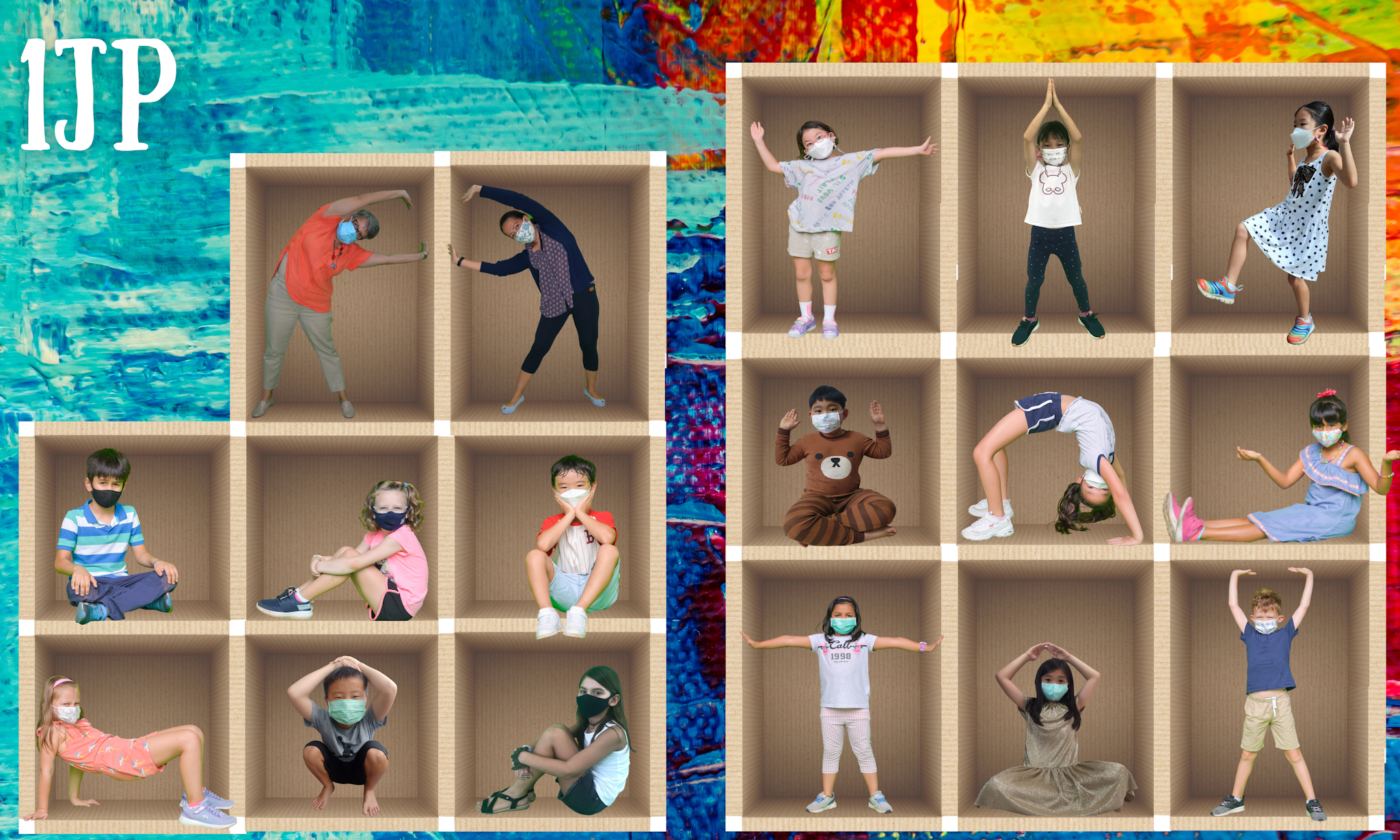
I was keen to break away from the traditional headshot passport photo galleries that were a feature of every yearbook in the past. I have always found them to be too formal and they don't capture the personality of the individual.  I started by creating a collection of ideas in which classes could be collaged together with fun themes for each grade level. Some examples of these were garden scapes, superheroes, a rainy day and 'What's your passion?'. As we had been transitioning into blended learning, I was able to photograph some students who attended school social pods using a green screen and the students who weren't able to come to campus sent in a head-to-toe photograph in front of a plain background. Each of these photos had the backgrounds removed so they could be layered together as a class.


We decided to keep masks on for these class photos to capture this unique school year. I used photoshop and the website www.remove.bg to remove the backgrounds and then layered the photos together in Canva which is an online app that allows editing layers of photos to create a digital collage.


Once the class layouts were made, it was easy to upload them to Book Creator. In Book Creator online, I added photos of online learning for each class and specialist subject area, special school events and even embedded videos. To make the yearbook more accessible, I included a Table of Contents to hyperlink to each section of the book and a back button on each page to allow a quick return to the Table of Contents. The finished book has over 215 pages and will soon be embedded on our school website. 


To cater to those individuals that really wanted a printed copy, I also made the PDF version available for printing on a photocopier. Here is a sneak peek at that hard copy version.  


Thursday, 3 October 2013

Authoring eBooks with the Deaf School in Jakarta

My current class is working on a project to author eBooks with the deaf school here in Jakarta. We have already had two face to face meetings. In the first meeting the Grade 4 from SWA travelled to the Santi Rama Deaf school. We paired up each student and got down to work.

As preparation, both Grade 4 classes learned how to do some simple ASL - American Sign Language. We learned to perform the song Fireflies in ASL. It was interesting to learn the song and quite fun too!

We learned during our first meeting with the deaf school that Indonesia has it's own sign language. Luckily it is really similar to ASL so we were able to use a lot of what we had learned in preparation. We found that being able to spell out words came in very handy!! My first sentence in sign language was 'What's your name?' and 'My name is Jane'.

Prior to our first meeting I travelled to Santi Rama with my partner teacher Ade to meet with the principal and discuss the details of the project. We agreed that the deaf students needed to prepare their stories in advance by writing them down on paper. We also asked that each child supply some drawings for the book illustrations.

In that first meeting we were able to begin making the story in Keynote. The plan was to create all the layouts in Keynote and then do the final formatting in Book Creator. Out issue is that there is only a small set of iPads at our school and we can only borrow them for a short period of time. It takes time to create a quality book so I will do the final format for the students in my class. The students will simply export their Keynote pages as JPEGs and I will put the videos and pages together and export them out of Book Creator as an ePUB3 files. 

In the second meeting the Santi Rama students travelled on our school bus to SWA. They had a great time playing with our students and working on the final video shoot for the sign language. It proved to be challenging for the deaf students to sign each sentence as they were using vocabulary that was not common so they needed extra support from their teachers. This is the first time that they had ever tried to make a digital story book that included sign language videos inside. Take a look at the school Vice Principal supporting this Grade 4 student to do the correct sign language for the sentence, 'Ghina was really happy and thanked God'. This story is about Ghina herself and how she celebrated her recent 11th birthday.


The books are looking quite nice and I am slowly putting the final touches on them in Book Creator. Take a look at these cover designs. My students are currently making Book Trailers in iMovie to promote each book. I can't wait to show you the finished products. It's certainly keeping the teachers; Jocelyn, Ade, Julie and myself all very busy!


Tuesday, 10 September 2013

Backpack Classroom Level 2

Tomorrow marks the second time that I will run the Backpack Classroom. This time I am taking my current class which is a Grade 4 class. They use Macbooks 1:1. Actually I will go with the whole year level. Our aim is to create 39 books.

What is the Backpack Classroom? 

This is a simple idea that I had at the end of last year. It is a way to help children with limited access to technology to create a digital book and to publish it. I originally took a backpack of iPads to a remote village in Sumatra to teach the children there to create digital books. It resulted in 9 books that to date have been downloaded over 20,000 times.

So what is different this time?

This time I am taking my current class from the International school that I currently teach at. My class has Macbooks as their 1:1 devices. We will keep it simple by using Keynote and Photo Booth to record the story. 

Where are you going?

We will go to the Santi Rama School in Jakarta. This is a school for deaf children. We have chosen to visit this school as our current topic is about how we can modify messages to suit a particular audience. The books will be tri-lingual. That means that there will be 3 languages included on each page. The children from the Santi Rama school understand Indonesian. They are all deaf children and use sign language to communicate. To make the books more accessible for an international audience we will translate the stories into English. My students will act as publishers and then promote the finished books to an international audience via their blogs and other online forums. 

Where did you get the idea to go to Santi Rama?

I have been visiting this school with different classes over the years. I have always gone to see them so that my students can make new friends and learn about communicating in sign language. This time the focus will be on to help each deaf student to create a digital book that we can publish to the world for other children to read. 

How will you make it work?

The idea is for each SWA student to have a Santi Rama student partner. The Santi Rama students have been preparing for tomorrow and have already written their stories on paper and made some illustrations. My students have been learning about how to create a digital book with embedded video on each page. They have also been learning how to create digital artwork to illustrate the book.

We are really looking forward to tomorrow. More information to come after our visit.

Tuesday, 13 December 2011

Traditional Architects


Did you know that in Bali, traditionally buildings were designed by making a miniature version? When I first visited the Green School in Bali, I met with John Hardy the owner. He told me that the huge buildings in the middle of the campus were made the traditional way. These buildings are made entirely out of bamboo. The buildings were designed by making a miniature version first. This is similar to how 5MJ is making a model of the Community Building for the Serpong Landfill.


You can see the real one being built in the background. At the Green School, the Grade 7 and 8 students are making their own clubhouse. You can see the photos on a Slideshare that I embedded just before this post. Notice the construction of the roof. The bamboo has to be close together to make sure that the grass on the roof can be tied down and made waterproof!!