Showing posts with label iPads. Show all posts

Sunday, 12 October 2014

Documenting the Learning Visually

For some time now I have been working with children in authoring and publishing books. I am myself an artist so I have a lot of theory running around in my head in regards to design. I wanted to use this blog post to communicate a few techniques that I use when documenting learning.

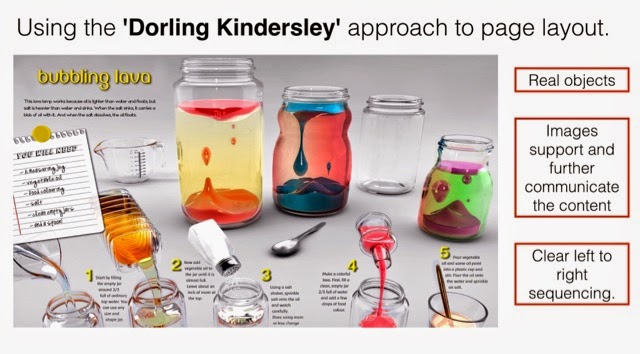
I am really inspired by books created by Dorling Kindersley. These books have a clear 'artefact' approach in their layout. The books are full of photos of real objects that really allow the reader to make strong connections to the content. Here is an example page layout from a Dorling Kindersley book.
 
Taking inspiration from this approach, I have tried to apply it to how a student may document their learning. By using an iPad, with the built in camera, students can easily capture the real objects that they are using in their learning and place them on the page along with written descriptions. 

A couple of design pointers:

1. The page is read from left to right and top to bottom. Therefore to help the reader, we should follow that pattern. 

2. Contrast helps us to access the content. Light on dark and dark on light. Make sure that your text colour and background have sufficient contrast so that the words can be easily read. 

3. Use open and easy to read fonts. Curly, handwritten fonts can be harder to read which means that our audience/readers can't access the content. 

4. Make sure that there is space around  the words. The readers need space so that they can easily distinguish the text from the pictures. 

5. Include the real objects and the method. Ask the students to teach the lesson or skills learned back to the teacher. This will help them to be able to think about their content. 

For this example, I used the Pic Collage app. After all parts have been completed ask your students to add a reflection so that they can think about what they could do better or do differently next time. 

Monday, 28 May 2012

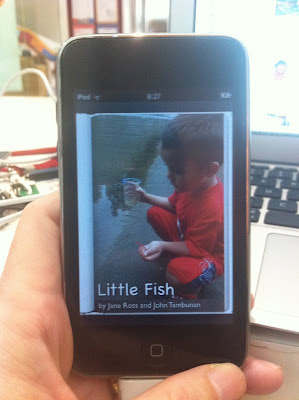
eBook Little Fish Hits 3,000 Downloads!

The success of Little Fish the eBook has been quite staggering. I first made this book with my son, John about a year ago in a printed version. John came home one day from playing to show me a tiny fish that he had caught from a river in the housing complex that we live in. He had so much to tell me about this fish and I encouraged him to take me to the river to show me where he caught it.

I took my iPhone to take photos and John rode his bike. I asked John to tell me the story as we went and I took photos to be later put into the book.

We downloaded the photos onto my Macbook and I put the story together using the program called Keynote. John was able to retell the story easily. We put a sentence for each photo keeping the story simple yet engaging.

Originally we wrote the story in Indonesian as John had only just turned 5 at the time and his English wasn't very fluent. Later I translated it into English. The result was then printed onto paper and I took it to a book binder to put a hard cover on it. John was able to share his book with his class but that's as far as it went.

I have been making books such as these for years here in Indonesia. Simple stories that can be printed up and hard bound for classroom use. It is very difficult to publish a book here in Indonesia. Most publishers will only print 3000 and so therefore will only choose books that have the potential to sell well.

'Little Fish' was well received by John's class and we kept a copy at home on our bookshelf. At that time there were no apps for creating books which allowed the user to have control over the layout. I have always used a simple layout style featuring large photos and simple text. I have preferred to use a landscape page orientation for picture books as I can make the picture really fill the page.

A few months ago I learned about an app on the iPad called Book Creator. I read that it can produce a file that is compliant with the requirements for the iBookstore. I started to use the app in different classes to produce books but I had not thought of publishing any of them. I decided that I needed a test product so I quickly revised 'Little Fish' making it in English only and adding voice recordings to make it more engaging.

I uploaded the book to iTunes Connect and set about getting it published. I have already written about that experience in a post here.

To date the book has been downloaded 3,000 times. I find myself thinking about why ...

It is simple and personal
It has full colour photos that show what happened
It has a voice recording which can help young children learning to read
It has been created by a child with help from his mother - not by a professional publishing house
What this means ...
It is amazing to think that people can now share their stories in this way. My son's book is regularly featured by Apple in the iBookstore alongside professional authors such as Beatrix Potter.  John gets feedback about his book from people on the other side of the world.  


The difference here is this book has gone through the same system that other authors experience - yet it was made by ordinary people.

Production - Editing - Selection (by Apple) - Marketing - Feedback

I know I keep saying this but this is the beginnings of the publishing revolution.


Thursday, 1 March 2012

New Life for iPod Touch Generation 2


Technology is continually updating and gadgets that were once the latest thing - are soon replaced by newer ones with more options. So was the fate of the 15 iPod Touch Generation 2 at my school. These iPods are only a couple of years old - but cannot be updated anymore.

So new apps won't work :( And the books that were made with my favourite iPad creation app Book Creator - WON'T WORK! These iPods can only be updated to iOS 4.2.1
This is a problem. I can't use the iBooks 2.0 app with iOS 4.2.1. I need the iBooks app to read the books that the students are creating. I am in the middle of a publishing project. As an ICT Coach, I have been working with several classes to create talking books.

What's the solution?

I went on Twitter - I tweeted about my problem. This is what Twitter is for me. It's my help line for Tech. I think that if I can share as much as I receive then I will have restored the cosmic balance. So I sent out a tweet - an SOS for help.

The app creator of Book Creator, Dan Amos @redjumperdan answered my tweet. He suggested that I try using iBooks v 1.2 but it's not easy to get a hold of an earlier version of an iPod app. Most links on the web direct you to the iTunes Store and the most recent version is the one that is available.

Where do you find past versions of iPod apps? oldipodapps.com?

Dan kindly sent me a copy of the version 1.3.2 but it didn't work with my iPod. What next? I even managed to get a copy of the iBooks .ipa file 1.2.2 but it still didn't work.

So why do I need these 'old' iPods to work ...


I love the talking books that my students are making with Dan's awesome Book Creator app but I needed a solution to create more access in the school community for viewing these books.
We are creating these books using the school iPads. We have a set of 20 iPad 2 and these iPads can be borrowed by teachers to use with students. In the beginning the iPads were very popular but as time went on they were being borrowed less and less.

As an ICT Coach, this is a concern of mine.
How can I get the iPads used more? How can I get the class teachers more interested to use iPads in their teaching and learning program?

I have taken on this challenge by making a publishing project. I use the Book Creator app to create the book and the Drawing Pad app to create the pictures and as well as this I use photos taken by using the iPad camera.

Book Creator App


Drawing Pad app

This works really well. We have been creating books in all Grades from 1-5. I have been working very closely with the Chinese teachers in the school as by using the Pinyin setting in the keyboard, the students are able to type in Chinese characters. In Indonesian language classes in Grade 1 we have also made several books. Soon Kindergarten will start to create books too.

Here are my students working in Chinese classes using the Book Creator app.


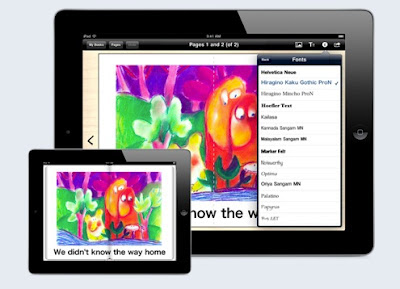
The Book Creator app is so user friendly and allows students to put words, pictures and voice recordings. It produces a book that can be read by the free app iBooks. iBooks works with the iPad, iPhone and iPod Touch.

So what's the problem?

The iPads have become rather popular ... now it's quite difficult to borrow one. This has prompted me to look for other ways of how the students might be able to view each others stories.

So - solution?

Jailbreak the iPod Touch ...

I am very fortunate to have access to a school Genius Bar aka iQbar. The iQbar is available to anyone in our school community. The guys that work there know a lot about Tech. Today I learned from them about how to jailbreak an iPod 2 using Green Pois0n , load Cydia - then update it, add the AppSync for 4.0+ and sync the iBooks 1.2 that I found online. It's also possible to add a source such as Hackulo.us to download that version of iBooks.

So the ending to this story ...


Yes! Now all I have to do is get the other iPod Touch jailbroken and set. It means a new life for the iPod Touch Generation 2 in our school.