Saturday, 31 October 2009

21st Century Learner Keynote

Today I am presenting as the keynote speaker at the Open University in Jakarta. I will present a session about the 21st Century Learner. This is a national educational seminar and the theme of the seminar is "The Impact of the Internet on the Younger Generation of Indonesians". I will speak in Indonesian today as this is my second language and the participants in the conference are all Indonesian speakers. I have embedded my presentation here for you to view via Slideshare.

Friday, 30 October 2009

21st Century Learning - Anywhere, Anytime

This film was taken on location on the island of Sumbawa in Indonesia. The Grade 5s from SWA went on a four day trip to learn more about how mining impacts the local environment. The students took their school Macbooks with them so that they could record their learning on location. Indeed portable technologies have empowered learning allowing it to be 'just in time'.

Antagonist vs Protagonist Comic

Here is a creative use of Comic Life in an English lesson. The students were asked to create a debate comic about Magellan. The students had to create both sides of the argument about whether Magellan was a hero or not. I think that this is a wonderful language activity that develops open mindedness. Click on the images to view them at full size.

Thursday, 29 October 2009

ICT Integration - Making it Easy


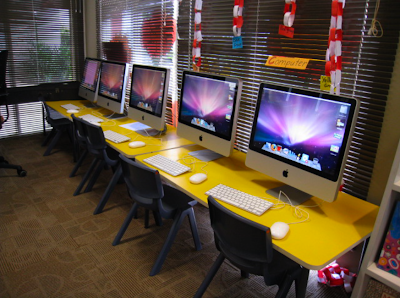
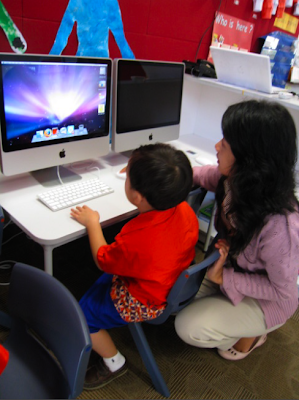
We have 5 lovely new iMacs in each of the Kindy classrooms. I wanted to set them up so that the students can use them independently as much as possible. Given that the users are as young as 3 years old I needed a strategy ...
First I changed the iMac settings for the desktop changing the icon size to the biggest one and increasing the text to 16pt.
Next I asked the Kindy teachers to send me links of sites or flash game files that they wanted to put on the computers. I also changed the dock so that only the most commonly used programs were shown there and I increased the size as well. A bigger size makes it an easier target for young users to click on.
Then I went into the requested sites and games and took a screen capture to be used as the icon for the game. This screen capture was dropped into Img2icn to create an icon for the shortcut.
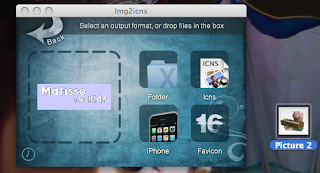


You can see the Img2icn in the picture above. Download it here IMG2ICN
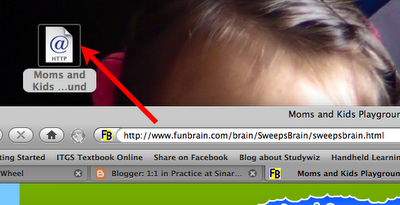

Next I dragged the link to the desktop to make a shortcut.
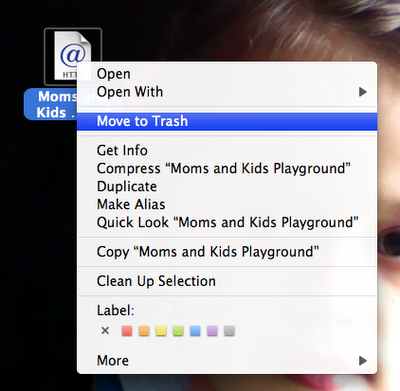

Then I right clicked on the new shortcut and selected "Get Info".
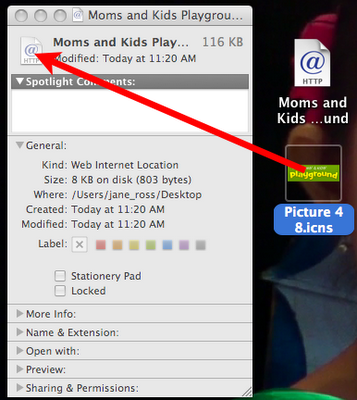

Next I took the newly created icon and dragged it onto the thumbnail until it changed the image.
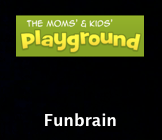

Finally changed the name into something short and there you have it, a lovely shortcut ready for the desktop. Now all the students have to do is double click to go to that website. These shortcuts can be kept in a documents folder so that teachers can drag out only the sites to the desktop that they want their students to access for the lesson. It takes only a few seconds. This way the young students can use the iMacs much more independently.

Tuesday, 27 October 2009

Making a Music Video IT Lessons

Here are some initial results of the grade 10 IT project "Make a Music Video". I have uploaded Gillan's video to the SWA You Tube Channel. The footage has been captured by the students to match with the music track that they had chosen themselves. Each student in the class is making their own music video. This project was initially story boarded and then shot scene by scene.

A Teaser Video Preview


In these photos you can see the grade 10 students shooting the footage for their "Make a Music Video" project. So far the students have made story boards to match the song lyrics and record any special props or camera angle notes.

Here is an example from one of the Grade 10 students who has quickly put together their first shots for their personal music video. I really like the angles that have been used here. It shows their knowledge about camera angles and composition. Well done Yoga!

Monday, 26 October 2009

Tweetboard (Alpha)

I just installed Tweetboard on this blog. You can find it by clicking on the small tab on the upper left side of the blog. The link to the Tweetboard site is http://tweetboard.com/alpha/


This app allows the user to log in right on the blog to make a Twitter update or to check their own Twitter updates. As we know, fewer clicks makes the whole user thing more friendly. I personally love Twitter as it enables me to carry on conversations with people from all over the world. By choosing like minded people to follow, I am able to control what I have access to. Twitter for me can be inspiring, funny or informative. The secret is in learning to express yourself in 140 characters or less.

Mr Bean Speaks Chinese?

At SWA we have three languages, English (language of instruction), Indonesian and Chinese. Chinese lessons are taught by native speakers and streamed into beginner, intermediate and advanced classes. I have been working with one of the five Chinese teachers at school over the past week. Rachel wanted to use more technology in her teaching to make the lesson more engaging for her students. She liked the idea of teaching the students to dub a movie.

The original idea was to take a Chinese movie but I suggested to use something that the students are more familiar with, like Mr Bean. Mr Bean has very little dialogue which makes it the perfect choice as students can create a voice over that explains what is happening rather than trying to match with a person speaking.

I asked the class of Grade 8 students to choose three different Mr Bean movies so we could download them from You Tube. The students chose the Camera One, The Baby One and The Swimming Pool One. The students were immediately engaged and started to ask for vocab that they didn't know.

We asked the students to take only 2 minutes of the clip and to add voice overs but this was allowed to be creative and not necessarily follow the original video. After that the students changed the Macbook International settings to ITABC for Chinese characters and created subtitles.

The end results have now begun to be published on the school LCD screens at the school cafes for the other students to watch. I have uploaded Marc's video here for you all to see. Chinese is a second language for Marc and I think that he has done exceptionally well. This video was shown recently in a shopping mall at the 21st Century Learner Seminar hosted by iMac (Apple) in Indonesia. It got a lot of attention and drew a big crowd.


Sunday, 25 October 2009

Simple Technology and Determination - A Winning Combination

I wanted to share this TED Talk that has inspired me so much. William Kamkwamba also keeps a blog http://www.williamkamkwamba.typepad.com/
I think that the quote in the screen capture below from his blog is really moving as is makes me realize just how much I take the Internet for granted.

It makes me wonder 'What can I do to help connect others to connect to the www? Today I visited a government school seeking to raise the quality of its teaching and learning program. The school had two computers, one laptop and one Windows PC for the whole school. The PC was locked up in a cupboard along with a wifi router. It was clear that this computer is rarely used in the teaching and learning process. The school has Internet access but not even the principal had an email address. It made me realize just how much I now take for granted in my current school. It was a sobering moment ...


My eBook has had over 10,000 views!

I just got an email notifying me that my eBook, "Movie Making for Kids" has had over 10,000 views. Take a look.

Myebook - Movie Making for Kids - click here to open my ebook