Showing posts with label Grade 2. Show all posts

Wednesday, 20 January 2016

Making Simple Paper Circuits

Today in Grade 2 we tried to answer a student question:

"How does a battery light up a light?"

We did this by exploring simple circuits. The students used copper tape, sticker LEDs and a button battery.  First we had a talk about batteries. The students were given a button battery to try to find the positive and negative sides.

We made a connection to how we use batteries in our toys. The students had a lot to say about how important it is to get the + and the - the correct way around. Next we used a template. This can make it easier for beginners as this was our first time to make a circuit. We used copper tape for the wires.


The copper tape can be bought online or at a hardware shop. It is best to use narrow tape for beginners as it will go around a corner more easily. If it is a young child, be aware that the edges of the tape are sharp and can cause a paper cut.


I made a quick circuit diagram as these learners are beginners. It was easily photocopied and all the students had to do was follow the lines for the tape. You need to note that the lines between the battery and one side of the LED must be strong and continuous. At the LED there is a break. Make sure that there is a little break here at that part between the positive and negative sides.


Put the sticker LED on after you have put down the copper tape.You can add extra copper tape on top if you need to make a stronger connection.


Once your circuit is complete you can add the battery to test your light. If it is not working, add some extra copper tape on the corners and either side of the LED light to help make your circuit stronger.


Here is a video of a finished circuit. The students added a drawing on top which featured a light to light up using their circuit.

Monday, 11 May 2015

Digital Citizenship. How Can We Say 'Thank You'


I am keen to act upon a recent recommendation to further develop digital citizenship practices at PIE. I must admit I have been focusing on the iPad roll out this year so this dropped off my radar.

Looking to next academic year, I would like to put some good practice into place. One of the biggest challenges is not only developing understandings about good Digital Citizenship practices but to sustain those good practices.

I have always believed in authentic experiences last the longest so I need an approach that would reflect this. Ongoing discussion is key.
Living in Indonesia it can be difficult to maintain the right perspective. You can readily buy pirated CDs at most shopping centres. Our students have difficulty in learning that just because you can access media, doesn't mean that you should take it and use it. Just because you bought a pirate CD or grabbed a resource online, doesn't mean that you can ethically use the contents. Some kids think that because they 'paid' for it (paid = spent $1 for the pirated copy) or found it themselves online - it's OK to use.

My message to students is citing information and media is like saying thank you to the one who made it. When someone does something for you, it's good manners to say thank you. Here is a way to say 'thank you'.

I am mostly working with the younger grades so I need some visuals to help bring the message and to give the class teacher a resource that they can refer to often. I have started working on some Info Graphic posters to be copied and put up in the classrooms. It is helping me that the current theme in Grade 4 is one of Digital Citizenship. I have been involved in talks with classes and from that I have a better perspective of the current situation.

I have made a start with posters for the younger grades. Take a look. I hope to build on this and level it up for older students. My first 3 are Recording Resources, Safe Information Searches and Safe Picture searches. I am looking for easy to follow accessible information. These posters will help classroom teachers get the message across and help them to remember what to do.

Thursday, 20 November 2014

Making Apps in Grade 2 with Tiny Tap

Today I worked with a student to create a simple app using Tiny Tap. This came about because one of the students showed an interest to make an app. He had tried using Tiny Tap before on his own iPad but had not made a game for learning before at school.

I too was new to Tiny Tap.

I made a time through the Homeroom teacher to sit with the student to explore Tiny Tap further. We looked at the example games on the site and play with a few of them to further understand what you could do. We then made an agreement to find out more ourselves and to meet again to create an app.

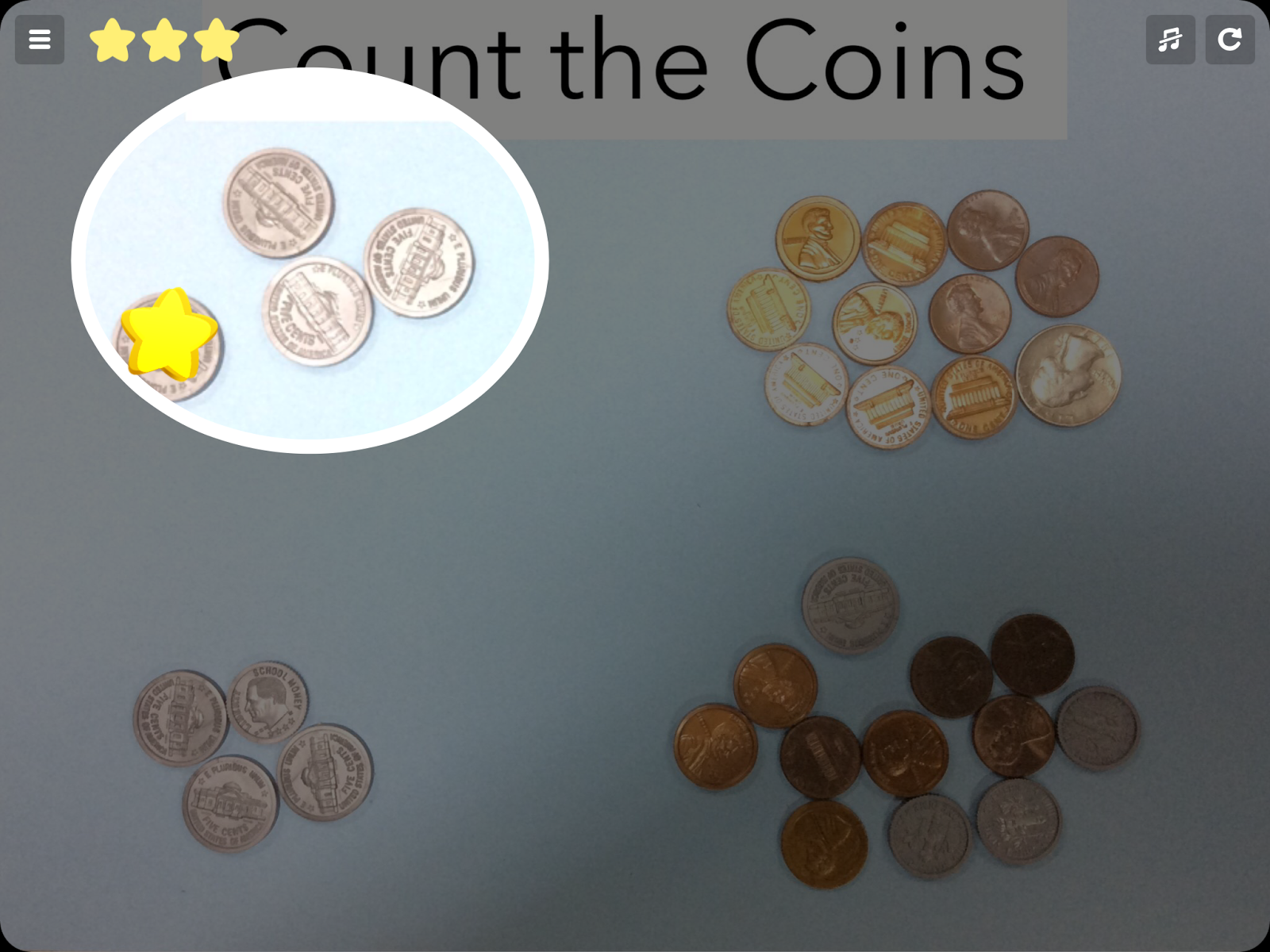
As with all technology use, I like to document the learning or to create something that furthers the learning. The class had been learning a lot about counting money so we decided to create a game about counting coins.

In my mind I mentally went through the steps that would be necessary to create the app. I purposefully wanted to use real items so that the students would be having to count coins to create their different answers.
To make it simple I asked the student to create 4 piles of coins on some colored paper. He then grabbed some scrap paper to write down the total amount for each group of coins. This required counting and checking - good we are practicing the actual skill even whilst creating the app!
Next we had to take a good clear photo of the coins and crop it to tidy it up. Then we opened the app Tiny Tap and started to build it. You simply add the photo and make it the background and add the title using the Text feature.

Finally we added some voice recorded instructions such as 'Tap on the pile of coins that make 43 cents'. When all the instructions had been added the app was saved and uploaded to the Tiny Tap server by the teacher and made private which means that it can't be accessed unless you have the URL. The URL was copied and a QR code created so that it can be scanned at school by other students wanting to try out the app.

Here are some screenshots from the finished app!


Tuesday, 8 June 2010

Pangeran Katak - The Frog Prince in Indonesian

This story was made by a Grade 2 student during Indonesian language time. The characters were hand drawn and captured with a digital camera. The frog was made using Spore Creature Creator. The story was completed using Keynote with voice overs and animation. This is the level that Grade 2 children can get to given support and plenty of access to technology. We run a mobile lab of Macbooks for Grade 1-3 students at Sinarmas World Academy.

Digital Storytelling in Grade 2

The Grade 2 students have their end of year class party today. They will present their digital stories to their parents.
Each story was written by a student, then the characters were hand-drawn on paper, photographed, then saved as a gif. These pictures were then put into Keynote and each student made their story with 'move' animation and voice overs. Here is a finished example:

Thursday, 5 November 2009

States of Matter - An Inquiry

The Grade 2 students made an inquiry into States of Matter. Next they will each make a personal inquiry into reversible and irreversible changes. The results will be made into a digital presentation using Keynote and Photo Booth.

Wednesday, 7 October 2009

Grade 2 - Kidspiration

Today Grade 2 used Kidspiration to record what they had made their family model out of. The family model was made as a part of the last UOI. This new UOI is all about different materials and their properties.